Web Design Packaging
Table of Contents
-
Industry Context: Why 2025 is different
-
Core Services & Features for Web Design Packaging
-
Scorecard: 12 evaluation points
-
Process (strategy → UX → CMS → prepress assets → launch)
-
Visual System & Information Hierarchy
-
Compliance & Risk Controls (non-legal)
-
Print Methods & Finishes (how to present them on the site)
-
E-commerce Readiness (thumbnail → PDP → unboxing content)
-
Sustainability (communicating without greenwashing)
-
Common Mistakes & Quick Fixes
-
Files, Color & Prepress (what printers need—and how to host it online)
-
Timelines, MOQs & Cost Levers
-
Hire CTA + Internal Portfolio Links
Industry Context: Why 2025 is different
-
B2B behaves like D2C. Distributors and brand managers expect instant pricing, 3D configurators, and live lead times.
-
Spec clarity wins. Sites that show dielines (with ≥3 mm bleed), trapping guides (0.08–0.12 mm), and overprint/knockout rules reduce back-and-forth and close faster.
-
Color confidence online. You must document Pantone governance with LAB values, ΔE tolerances, and side-by-side CMYK simulations.
-
Camera shopping. PDP images must read at 120–160 px; barcodes/QRs need visible quiet zones in photos and downloads.
-
Sustainability scrutiny. Buyers want proof: material specs, recycled content %, and end-of-life guidance—no vague claims.
Core Services & Features for Web Design Packaging
-
Site architecture for packaging (Materials → Formats → Sizes → Finishes → MOQ/lead time).
-
Product templates for cartons, labels, pouches, tubes, corrugate—each with spec tabs and CAD downloads.
-
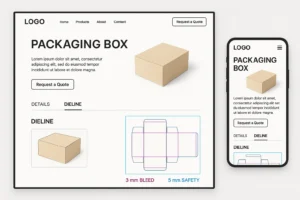
Spec library: dielines (AI, PDF), prepress checklist, Pantone/ΔE guide, barcode placement rules.
-
Price/RFQ systems: tiered MOQ logic, freight estimator, custom quote workflow.
-
3D mockups & AR: browser-based model viewer, true-to-scale packs.
-
Configurator: size sliders, board caliper, finish toggles, security options (TE labels, holograms).
-
Sustainability dashboard: materials matrix, recyclability icons, certificates.
-
Content stack: case studies, blog, comparison charts, downloadable checklists.
Scorecard: 12 evaluation points
-
Navigation clarity: users find their pack type in ≤2 clicks.
-
PDP readability at thumbnail: variant name + key spec legible at 120–160 px.
-
Spec completeness: dieline with 3 mm bleed, 5 mm safety, fold/glue, TE callouts.
-
Prepress rules: trapping (0.08–0.12 mm), overprint/knockout map, rich black guidance.
-
Color governance: Pantone master, LAB targets, ΔE ≤ 2.0 published.
-
Barcode/QR: quiet zones ≥ 2.5 mm stated; demo images show correct placement.
-
Configurator logic: outputs valid SKUs, MOQs, and lead times without dead ends.
-
Conversion plumbing: RFQ form with file upload, sample request, and WhatsApp click-to-chat.
-
Performance: LCP < 2.5s; image CDNs; lazy-loaded 3D.
-
Trust signals: COA/QA process page, plant photos, press-OK checklist.
-
Sustainability proof: recycled % and disposal guidance by region; no vague “eco” badges.
-
Schema & SEO: Article/FAQ/Product schema; Rank Math fields complete.
Process (strategy → UX → CMS → prepress assets → launch)
-
Discovery & segmentation
-
Target users (brand owners, print buyers, ops). Map their primary jobs (quote fast, verify spec, order samples).
-
-
UX blueprint
-
Card-sort navigation; 12-column grid; sticky spec tabs (Materials, Dieline, Finishes, Compliance).
-
-
Content matrix
-
Lock mandatory spec copy per product: board caliper, flute, finish, MOQ, tolerance, barcode rules, overprint/knockout notes.
-
-
Component design
-
PDP sections: hero gallery, price/RFQ, configurator, spec downloads, FAQ, reviews, sustainability.
-
-
Prepress asset creation
-
Dielines with ≥3 mm bleed, 5 mm safety, fold/glue/TE layers (non-printing).
-
Trapping guide (0.08–0.12 mm), Pantone LAB & ΔE notes, barcode quiet zone diagrams.
-
-
CMS & data
-
Variant tables, finish libraries, color bibles, MOQ ladders, shipping rules.
-
-
3D & imagery
-
Neutral lighting, honest color (ΔE notes), macro shots for finishes; e-comm thumbnails tested at 120 px.
-
-
QA & accessibility
-
Contrast ≥ 4.5:1; keyboard nav; alt texts include the exact product and web design packaging where relevant.
-
-
Launch & analytics
-
Goal tracking for RFQs, sample requests, configurator completes; heatmaps on PDP spec tabs.
-
-
Scale
-
Add calculators (pallet/cube, caliper vs crush), market landing pages, and a prepress “Upload & Preflight” tool.
Visual System & Information Hierarchy
-
Top band: product name + variant; primary CTA (“Get Instant Quote”).
-
Spec ribbon: MOQ, lead time, material, finish icons.
-
Image rail: hero → macro finish → dieline blueprint → in-hand scale → palletization.
-
Tabs: Dieline & Prepress, Print Methods & Finishes, Sustainability, Compliance, Downloads.
-
Color coding: one hue per category (Cartons/Labels/Pouches), with neutral backgrounds to keep color accuracy believable.
-
Iconography: TE, CR, recycle, barcode, QR, Pantone chip, ΔE badge.
Compliance & Risk Controls (non-legal)
-
Publish a master controlled copy for each product spec PDF; version every change (rev codes).
-
Provide UID/serialization fields on labels/cartons; recommend placement and font specs.
-
Warn against relying on color alone for variant differentiation; suggest patterns/symbols.
-
Add a tamper instruction panel template for TE labels/shrink.
Note: Guidance only—confirm with your regulatory team.
Print Methods & Finishes (how to present them on the site)
-
Litho offset (cartons/inserts): crisp text; show photos of micro-type.
-
Flexo (labels/corrugate): plate count vs unit cost chart.
-
Digital (Indigo/inkjet): low MOQs, variable data; note limits for metallics/spot whites.
-
Finishes: aqueous (matte/satin), soft-touch (smudge caution), spot gloss (avoid over warnings), foil/emboss (show register tolerances).
-
Security: microtext, UV inks, holographic threads—display macro photos and where to place them.
E-commerce Readiness (thumbnail → PDP → unboxing content)
-
Thumbnail: strength/variant readable at 120–160 px; no busy backgrounds.
-
PDP: 6–8 images—hero, dieline blueprint with bleed/safety, macro of finish, barcode placement with quiet zone box, sustainability icons, pallet shot.
-
Unboxing content: step-by-step TE removal image; QR video for assembly (tuck flaps, crash lock).
-
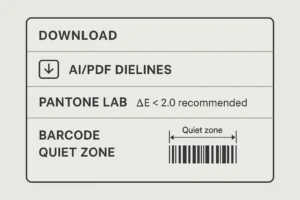
Downloads: AI/PDF dielines, prepress checklist, color bible, barcode size spec.
Sustainability (communicating without greenwashing)
-
Publish material matrices with recycled % and regional recyclability.
-
Suggest mono-material options; mark exceptions where barrier is required.
-
Show right-weighting case studies (board caliper reduction vs compression).
-
Provide disposal guidance by region via QR; keep claims specific and provable.
Common Mistakes & Quick Fixes
-
Glamour images only → Add dieline and prepress tabs; conversions will rise.
-
No barcode rules → Provide quiet zone diagram and approved placements; reduce print fails.
-
Over-saturated renders → Note color honesty; include ΔE and Pantone references.
-
Hidden RFQ → Keep “Get Instant Quote” sticky; add sample request CTA.
-
Slow galleries → Use WebP/AVIF; lazy-load; CDN.
-
One vendor lock-in → Explain dual-sourcing with equivalent specs to build buyer trust.
Files, Color & Prepress (what printers need—and how to host it online)
-
Downloads per product:
-
Dieline AI/PDF with ≥3 mm bleed, 5 mm safety, non-printing layers for dieline/fold/glue/varnish/foil/white ink/security.
-
Trapping rules (0.08–0.12 mm), overprint/knockout map, rich black policy (e.g., C60 M40 Y40 K100 for large solids only).
-
Pantone & LAB targets; ΔE ≤ 2.0 tolerance note; CMYK simulations.
-
Barcode spec (UPC/EAN magnification, height) with quiet zone ≥ 2.5 mm.
-
Preflight checklist (PDF/X, image resolution 300 ppi, line art 1200 ppi, total ink limit).
-
Timelines, MOQs & Cost Levers
-
Discovery/UX: 1–2 weeks
-
Design system & components: 1 week
-
Content & prepress assets: 3–7 days
-
Build & integrations: 1–2 weeks
-
QA & launch: 3–5 days
-
Levers: reusable PDP templates, shared dieline library, standardized finish icons, calculator components, modular pricing tables.
-
MOQs: publish tiers clearly; let users toggle digital vs offset to see cost/lead impact.
Hire Us + Internal Portfolio Links
Need a site that sells packaging—not just shows it? We design the UX, build the CMS, and ship a full web design packaging stack with specs, calculators, and 3D that buyers trust.
-
Supplements & label systems (spec-heavy layouts):
https://usmandesigner.com/portfolio/supplement-label-design-freelancer/ -
High-fidelity consumer packs & 3D visuals:
https://usmandesigner.com/portfolio/vape-packaging-design-store/ -
Premium cartons & complex dielines:
https://usmandesigner.com/portfolio/sushi-packaging-design/FAQs
1) What pages are must-have for web design packaging?
Home, Category (by format/material), PDP with spec tabs, RFQ/instant quote, Spec Library, Sustainability, QA/Press-OK, Case Studies, and a Prepress Upload page.2) How do I handle complex variant logic?
Use a configurator tied to a SKU rules engine (size ranges, caliper, finishes). Output a valid quote with MOQ/lead time and downloadable dieline.3) How do I present color accurately online?
Publish Pantone LAB targets, show CMYK simulations, and state ΔE tolerances; include a disclaimer about device variation.4) What should be in a downloadable dieline?
≥3 mm bleed, 5 mm safety, fold/glue, varnish/foil/white-ink layers, TE markers, barcode & QR zones, and overprint/knockout notes.5) Can I reduce support tickets from prepress issues?
Yes—add a Prepress Checklist (PDF/X, 300 ppi, trapping 0.08–0.12 mm, no overprint on small type) and an automated preflight upload.6) How do I communicate sustainability credibly?
List recycled content %, region-specific recyclability, mono-material options, and disposal instructions via QR—no vague “eco friendly” claims.7) What boosts conversions the fastest?
Sticky RFQ, clear MOQs/lead times, a lucid dieline tab, fast thumbnails, and real-world macro finish photos.